

How to Program Your Garage Opener with Ford HomeLink
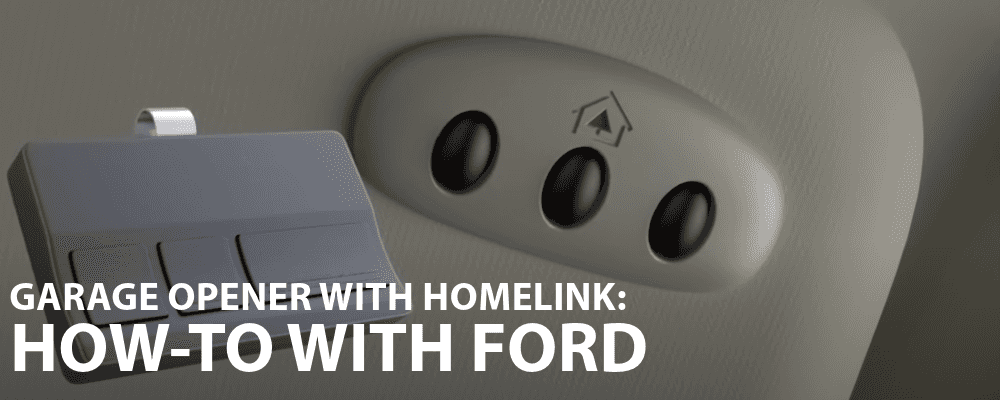
Programming your garage door opener to your Ford vehicle is a convenient feature that allows you to easily open and close your garage without needing a separate remote. Whether you’re a tech-savvy driver or someone who’s never attempted this before, this guide will walk you through the process step-by-step, ensuring a smooth setup. If you’re in Spokane, Coeur d’Alene, or nearby areas, Wendle Ford is here to assist with any questions or troubleshooting you might need along the way.
Why Program Your Garage Door Opener to Your Ford Vehicle?
Having your garage door opener integrated into your Ford vehicle offers several benefits:
1. Convenience: You don’t need to fumble with a separate remote.
2. Security: By eliminating the need for an extra device, you reduce the risk of losing your garage door opener.
3. Efficiency: The built-in system allows for easy and quick operation.
4. Appearance: You no longer have to worry about the damage that might be caused by a remote that is kept hooked on a visor.
Step-By-Step Instructions to Program Your Garage Door Opener
Ford vehicles equipped with the HomeLink system makes this process straightforward. Our guide will walk you through the setup process.
Step 1: Prepare Your Garage Door Opener and Ford Vehicle
Before you start programming:
- Make sure you have the garage door remote control.
- Turn on the vehicle ignition.
Step 2: Program the HomeLink Buttons
1. Hold the garage door remote: Hold the remote a few inches away from the HomeLink buttons on your Ford vehicle.
2. Press the desired HomeLink button and the remote button: Choose one of the three HomeLink buttons that you want to program for your garage door. Press this button and the HomeLink indicator button will begin blinking slowly. Holding your garage door remote one to three inches away from the HomeLink buttons, press and hold your garage door remote until the HomeLink indicator light changes from flashing slowly to either flashing rapidly or solid.
3. Test the system: After programming, press the programmed HomeLink button and see if the garage door responds. If it does, the programming is complete. If not, proceed to the next step.
Step 3: Sync with Rolling Code Systems (if necessary)
Many modern garage door openers use rolling codes for added security. If your garage door opener uses a rolling code system, an additional step is required to sync the opener with your vehicle.
1. Locate the “Learn” or “Smart” button on the garage door opener motor: This button is usually located on the back or side of the motor unit. You may need a ladder to reach it.
2. Press the “Learn” button: After pressing it, you’ll have about 20-30 seconds to return to your vehicle and complete the programming.
3. Within 20-30 seconds, press the programmed HomeLink button in your vehicle: Hold the selected function button for two seconds then release it. Repeat this step up to three times.
Step 4: Test and Fine-Tune
Once you’ve completed the programming, it’s essential to test the system:
1. Press the HomeLink button: The garage door should open or close as expected. If it doesn’t, repeat the programming steps, ensuring that the correct buttons are pressed.
2. Reprogram if necessary: If you’ve made a mistake or need to reprogram a button for a different door or device, simply follow the steps again.
Troubleshooting Tips
- Weak Signal: If the HomeLink system isn’t responding, ensure that the remote’s battery is fresh and that you’re holding the remote close enough to the HomeLink buttons during the programming.
- Multiple Doors: You can program up to three different doors or devices using the three available HomeLink buttons.
- Consult the Manual: If you’re still having trouble, refer to your vehicle’s owner’s manual or visit Wendle Ford for personalized assistance.
See Wendle Ford for Your Programming Needs
Programming your garage door opener to your Ford vehicle is a valuable feature that adds convenience to your daily routine. While the process is relatively simple, it’s important to follow each step carefully to ensure a successful setup. If you encounter any issues, don’t hesitate to reach out to the experts at our Spokane dealership. Our team is ready to help with any questions or concerns, ensuring that your Ford vehicle is equipped to meet all your needs.
Whether you’re a long-time Ford owner or new to the brand, Wendle Ford is your trusted partner in Spokane for all things Ford. From helping with technical setups like garage door openers to providing top-notch service and maintenance, we’re here to keep your driving experience smooth and enjoyable. Visit us today and let us know how we can assist you.
Frequently Asked Questions
Can I program HomeLink without the original garage remote?
No. HomeLink needs the signal from your working handheld remote to learn the correct frequency. If your remote is lost or broken, you’ll need a replacement remote before programming your Ford’s system.
Why does my HomeLink stop working after a power outage?
After a power outage, some garage door openers lose their memory of connected devices. Press the “Learn” button on the opener motor and re-sync your Ford’s HomeLink button to restore functionality.
Can HomeLink work with smart garage systems?
Yes. Many smart openers such as Chamberlain and LiftMaster MyQ systems are compatible with HomeLink, but they may require an adapter or bridge device to communicate properly with your Ford vehicle.
How do I know if my garage door opener uses a rolling code?
If your opener was made after 1996, it likely uses a rolling code. You can confirm by checking for a “Learn” or “Smart” button on the opener housing, which indicates rolling code technology.
Who can help if my HomeLink still won’t program?
The service team at Wendle Ford in Spokane can assist with troubleshooting and ensure your system pairs correctly. We can also check your vehicle software for updates that affect HomeLink performance.
0 comment(s) so far on How to Program Your Garage Opener with Ford HomeLink